The contract for the new system is signed and the cutover is set for the first day of the quarter. The vendor asks for the history in CSV, the IT team exports the tables and the schedule fits in three weeks.
Except that the first import stops halfway through, with the message that the value does not fit the column type. Then finance opens the new system and cannot find the cancelled orders from 2019. Neither problem is about volume.
What delays a migration are the fields nobody mapped, the dates stored in three formats and the table the operations team kept by hand. None of this shows up in the estimate. It shows up in the first load.
In this article we explain what separates migration from integration, the four scenarios where it appears, the two ways to run one and how to check that the data arrived intact.
Data migration is not data integration
Mixing the two is the most common reason a migration project runs over.
Migration ends. It is a change of address: the data leaves one place, arrives at another and the old place is switched off. Success is measured once — everything arrived, it arrived right, the business kept running.
Integration is routine. It does not end: every day the new data has to arrive, and success is measured every day.
Treating a migration as an integration builds a permanent structure for a temporary problem. Treating an integration as a migration produces one heroic load and, a week later, the discovery that nobody planned how to keep it up to date.
One question separates them: is the source system going to be switched off? If it is, this is a migration, and it has an end date. If it is not, both systems will live side by side, and that is integration — with routine, monitoring and a bill that comes back every month.
New system, cloud, consolidation and analytics
Replacing the core business system. The most common scenario and the hardest one, because different systems model the same business in different ways. There is no direct field-to-field match, and somebody has to decide what becomes what.
Moving from the local server to the cloud. Technically the simplest, because the structure is usually preserved. The challenge is the window: how long the business can stay down.
Consolidating several databases into one. It shows up after a merger or an acquisition, and after years of systems that grew apart. The work is not moving — it is reconciling keys and spotting the same customer registered in three places.
Replacing the analytics platform. Moving from one warehouse to another tends to be underestimated, because it looks like a reload. Until somebody remembers the reports that depend on that model.
All four demand the same care for different reasons: in the first two the risk is the downtime window, in the last two it is the data model.
Scheduled downtime or continuous migration
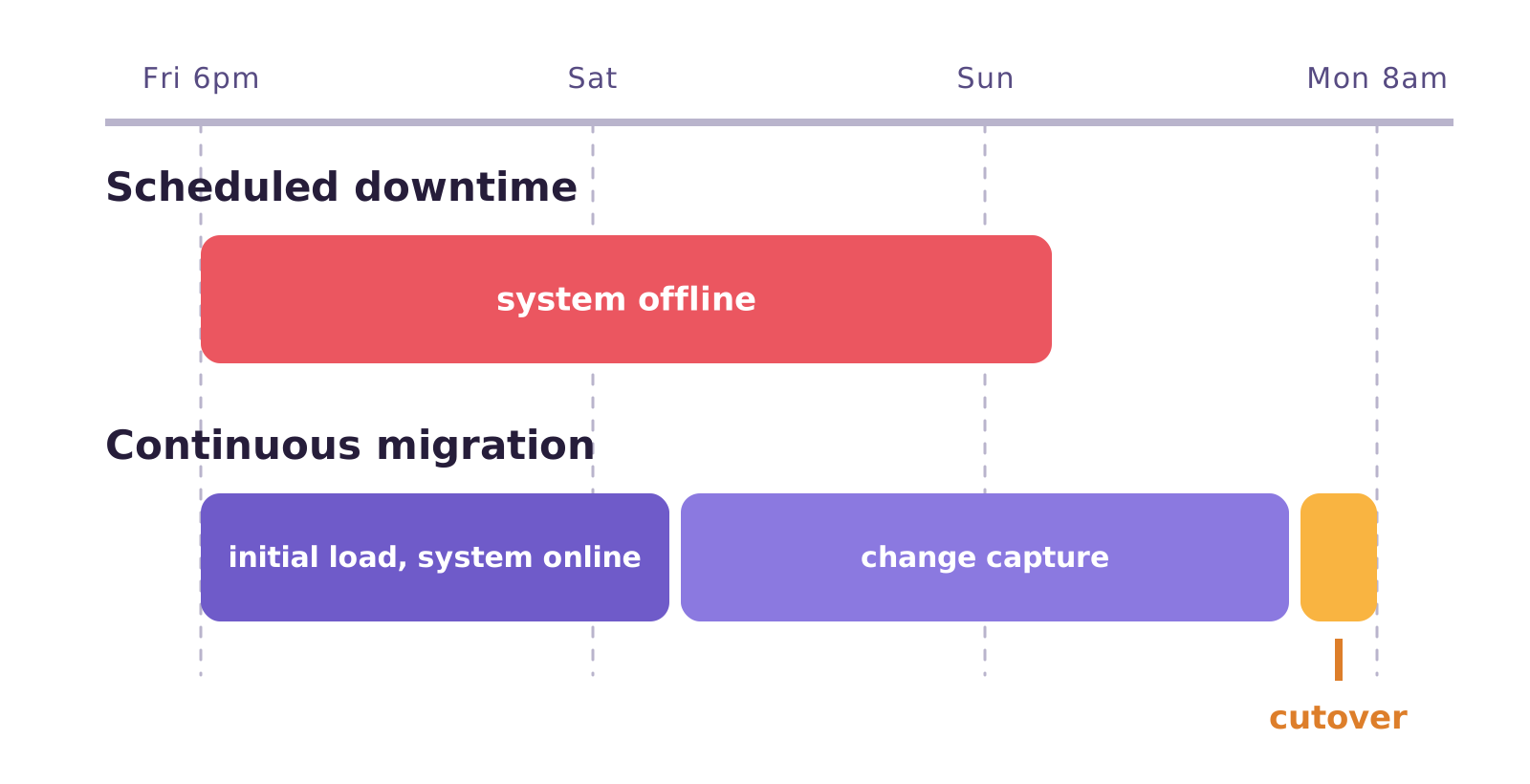
Scheduled downtime. You switch the system off on a Friday night, move everything, validate on Saturday and switch it back on on Sunday. It is simple to understand and to coordinate.
The problem is the size of the window. If the load takes longer than planned, the Monday morning decision is between rolling back and running on incomplete data. It works when the volume fits the window and the business accepts being down.
Continuous migration. Three stages: a full initial load with the source system running normally, the capture of the changes that happen during and after that load, and the cutover.
With both sides identical, the business moves to the new system. The downtime window stops being the length of the load and becomes the length of the cutover — from a weekend to a few minutes.
The cost is complexity: it requires reading the transaction log on the source database and somebody watching the difference between the two sides until the cutover. Neither path is free, and the choice is between stopping the business and running two systems for a few weeks.
What breaks in a data migration
What blows up the schedule is almost never the volume. It is what nobody mapped before starting.
- Format and type. The date that arrives as text, the amount with a Brazilian separator, the yes-or-no field stored as S and N in one system and 1 and 0 in another.
- The key that does not exist. A table with no primary key in the old system. Without it, there is no way to tell which row changed or to check that it arrived.
- What the team kept by hand. The exceptions spreadsheet and the notes field where somebody wrote structured information. It is not in the model and it is indispensable.
- The deleted record. If the source deletes physically and you do not capture that deletion, the destination piles up data that no longer exists.
- Validation left to the end. Finding out on the eve of the cutover that 40,000 rows are missing is the worst possible moment to find that out.
A concrete example
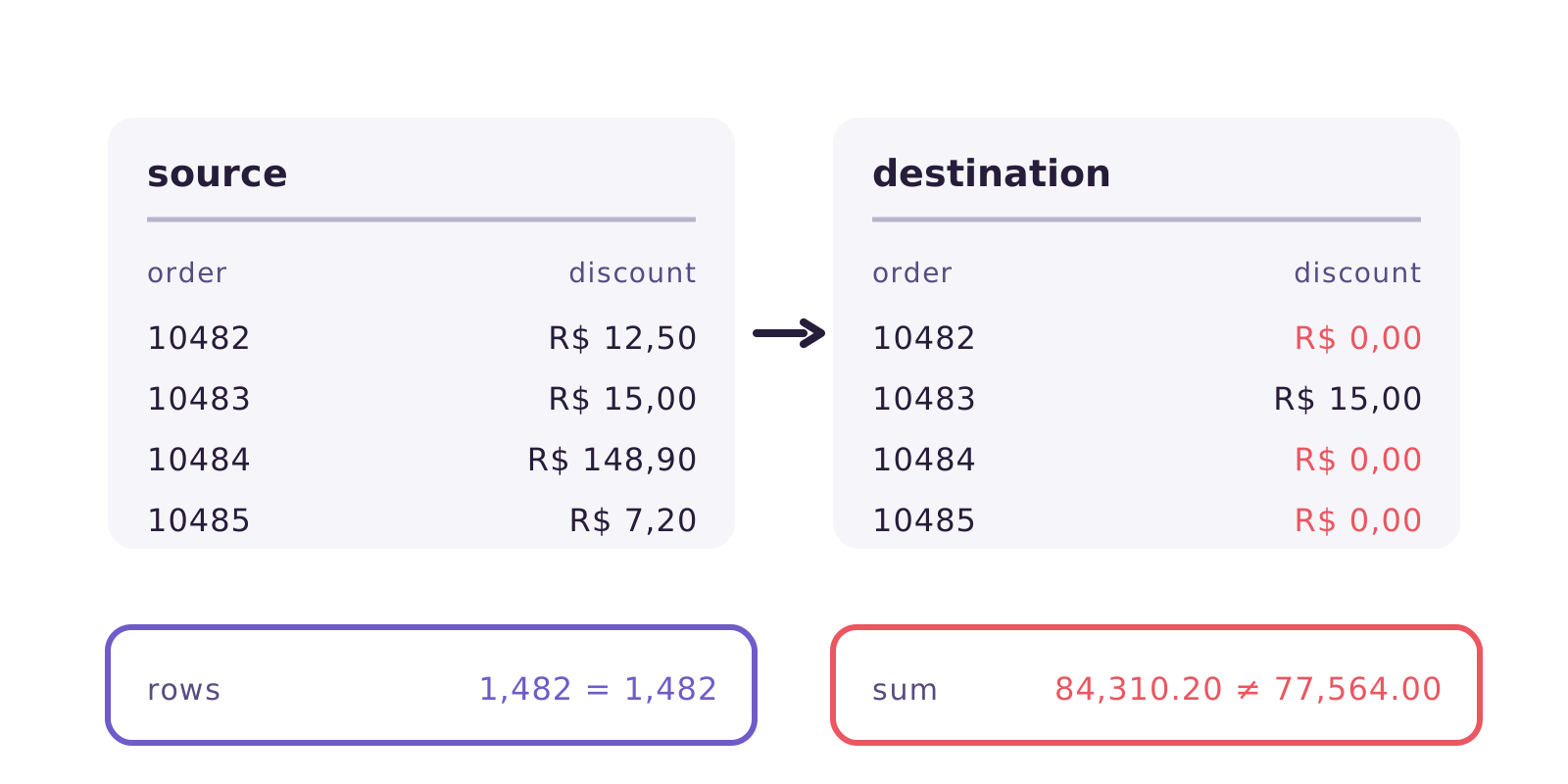
A retail chain migrates its sales system over a weekend. The load runs, the order count matches and everyone celebrates. On Tuesday, the revenue report comes in 8% below the previous month: the discount field arrived as text with a decimal comma and was read as zero on every row that had cents. Nobody checked the sum of the values, only the row count.
How to check the data arrived intact
A row count is the minimum, and it is not enough. Four checks catch most of what usually slips through:
Row count per table, source against destination. It catches a missing row, not a wrong value.
Sum of the numeric fields. Total revenue, total quantity, balance — this is what would have caught the case above.
Targeted sampling. Not random rows, but the hard ones: the oldest order, the largest one, the one with a special character in the name, the one that was cancelled.
A declared test that runs on its own. A required field that cannot arrive empty, a key that has to be unique, a value that has to be on a list. Running on every load, the error shows up the day it appears, not on the eve of the cutover.
The rule is simple: validate during, not after.
Where Januss comes in
Januss serves the second path, the continuous one. A full initial load, change capture from the transaction log on PostgreSQL, MySQL, SQL Server, Oracle and MongoDB, and both sides in sync until the cutover. Deletions show up, because the reading comes from the log and not from a scheduled query.
Before the first load, it checks the CDC prerequisites on the source — wal_level, binlog_format=ROW and their equivalents. When one is missing, the screen shows the command that fixes it, including the different path for Amazon RDS.
Format is handled during the load: thirteen conversion rules you chain per column, with eight regional formats, including R$ 1.234,56. And you decide, column by column, what happens to a value that does not convert: stop the run or write null.
Quality tests run on every load, not at the end. An empty required field, a duplicate key, a broken relationship — each test can either record a warning or stop the run and block whatever comes after it.
Two things Januss does not do, and it is worth knowing beforehand. It does not convert the model: deciding that field A in the old system becomes field B in the new one is still your work, in SQL. And writes go in JDBC batches, with no native bulk load — for very high volume on a short deadline, a tool specialised in mass movement will be faster.
For the most common scenario — migrating while the business stays up, and going on syncing afterwards — the design fits. And there is an advantage that only shows up at the end: once the migration is over, the structure keeps working as an integration instead of being thrown away.
Want to try it with one of your own tables first? The 14-day trial does not ask for a card: create your workspace.
Create your workspace in minutes.
Point at your source and watch the data reach the database the same day.