
It is month-end close, and finance needs the total. Someone exports the entries from the ERP, pastes them into the tracking spreadsheet and goes for coffee while the file recalculates. At the same time, sales tries to enter three orders and gets the message that the file is locked for editing by another user. They save a copy on their own computer. At Monday's meeting, the two numbers do not match.
None of this arrived at once. The spreadsheet grew for two years, one tab per month, and nobody decided it would become the department database. It just did.
In this article we explain what actually weighs a large spreadsheet down, why the most quoted limit is almost never the problem, which fixes merely postpone the pain and which ones solve it.
The one-million-row limit is not what slows your file down
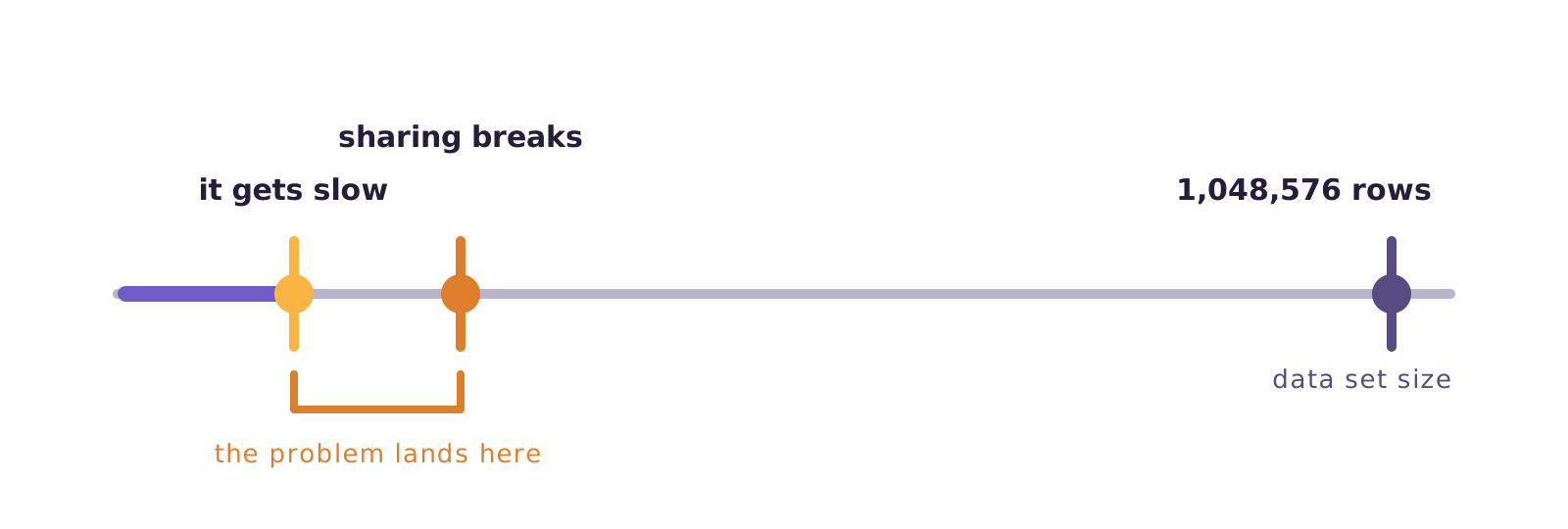
Microsoft publishes the number: a spreadsheet holds 1,048,576 rows by 16,384 columns. Anyone getting close to that gets a warning on import. The message says the data set is too large for the grid, and that saving there means losing whatever was not loaded.
Except almost nobody gets to that point. The spreadsheet becomes unusable long before, and for a different reason.
What weighs is not the number of rows stored. It is the amount of calculation on top of them. Every formula that scans the whole data set is recalculated on each change. Thirty formula columns over two hundred thousand rows are six million calculations per keystroke.
The file with a million rows and no formulas opens fast. The one with a hundred thousand rows and a lookup into another tab does not.
The real limit is your computer, not the program.
Four signs the spreadsheet became a database
It is not size that marks the turn. It is use.
- More than one person edits it. The moment two people need to write to the same file, you have a database problem, not a spreadsheet problem.
- Somebody updates the data by hand every week. Copying and pasting from a system into the spreadsheet is a data load done manually, with all the risks that carries.
- There is a tab nobody is allowed to touch. That is the reference table. In a database it would have a key and a constraint. In the spreadsheet, it has a warning in red.
- History lives in monthly tabs. January, February, March. That is improvised partitioning, and it breaks the moment someone needs to add up the whole year.
If three of the four describe your case, the problem is not your Excel version.
Splitting, archiving, changing format, buying memory
Four common reactions, all understandable and all temporary.
Splitting into several files or tabs. It fixes opening time and creates a worse problem: the analysis that needs everything together now depends on someone consolidating. And manual consolidation gets things wrong.
Archiving the old rows. Works until the first question comparing against last year.
Moving off the old file format. Worth doing, because the old Excel format holds far fewer rows and the loss happens silently. But that raises the ceiling; it does not change the nature of the problem.
Buying more memory. Postpones it a few months and teaches the team that the answer is a better machine.
Every fix on this list buys time. None of them changes the design.
Data model, database, automated load
Take the data out of the grid and into the data model. Power Query brings the data in and the Excel data model holds far more than the sheet shows, because it does not draw cell by cell. It is the cheapest fix, works without leaving Excel and solves a good share of cases. The limit: it is still a file, on somebody's computer.
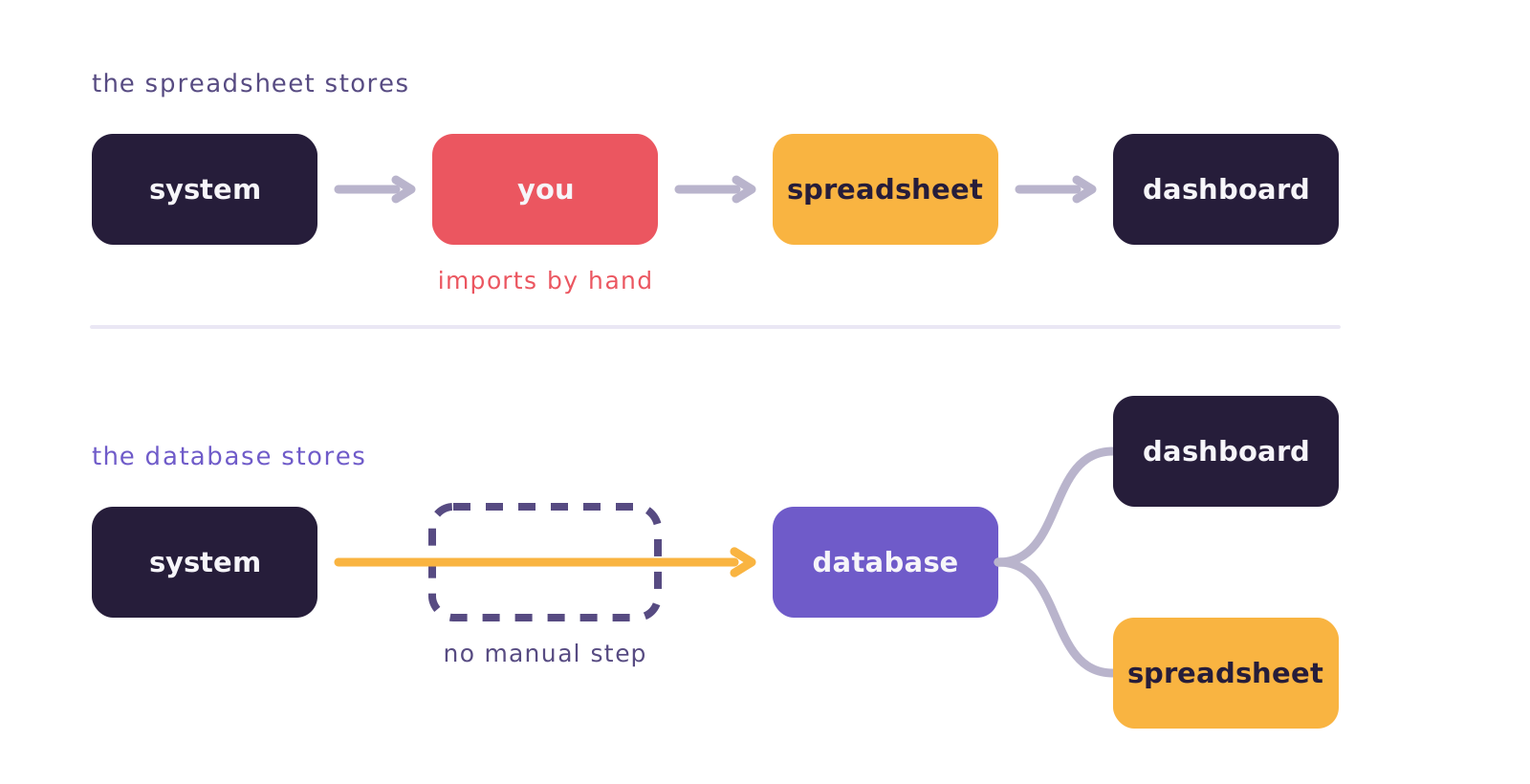
Move the data into a database and point the BI tool at it. The spreadsheet stops being where the data lives. It becomes where someone occasionally looks. Power BI, Metabase and Looker Studio read from the database, and volume stops being an issue. It is the change that actually solves it, and the biggest decision of the three.
Automate the load. This is the part almost always left out. A database is no use if somebody keeps exporting from the system and importing by hand every Monday. As long as there is a manual step in the chain, there is a day it does not happen.
When it is not worth leaving the spreadsheet
Worth saying, because most of the content on this subject is written by the people selling the alternative.
A small, stable data set, one person editing, analysis that changes every week: spreadsheet. Building a database for that raises the cost with no gain at all. The freedom to write anything in any cell is a real advantage, and no data tool offers it.
A concrete example
The sales team keeps a spreadsheet of targets per rep, fifteen rows, reviewed once a month in a meeting. Someone suggests moving it into a database. Not worth it. Maintaining the integration costs more than the problem it would solve.
The question is not whether the spreadsheet is good or bad. It is whether it is being used as storage.
Where Januss comes in
Januss does not write to spreadsheets. Worth saying up front, because it is the opposite of what this article's question suggests: the destinations are databases, analytical stores and file storage. None of them is Excel.
The logic is that of the second fix in the previous section. Data leaves the source system and goes into the database, on a scheduled load with no manual step. The dashboard reads from there. The spreadsheet still exists for the one-off analysis — it just stops being where the information lives.
And it can come in from the other side. Google Sheets and Excel files are sources in Januss, with a choice of tab and header row. That spreadsheet someone maintains by hand becomes a pipeline source instead of an island. The targets table, the category list, the contract tracker: all of it starts feeding the database. The manual work stays where it makes sense, and its result reaches the database along with everything else.
Your spreadsheet is still the best place to think. It just does not have to be the place where everything is kept. Want to try it with data of your own? It is a 14-day trial, no credit card: create your workspace.
Sources
The spreadsheet limits come from Microsoft's own documentation:
Create your workspace in minutes.
Point at your source and watch the data reach the database the same day.