It is the fifth of the month, the invoice from your integration tool arrived, and it is bigger than the last one.
Nobody turned on a new pipeline. Same tables, same schedule, same report on Monday morning. Whoever owns the data opens the usage screen and cannot find what changed.
The problem is that the bill does not measure data. It measures a counter. And the market has at least four different counters, each reacting to something else inside your pipeline.
In this article we explain the four billing units that show up in integration contracts, what makes each one climb, and how to find out which one is on your invoice.
Four billing units, four different invoices
Every integration tool needs a number to charge for. That choice is not a contractual detail. It decides what part of your operation turns into money.
- Rows read. Counts everything the pipeline pulled from the source, including what was dropped along the way.
- Rows written to the destination. Counts what actually landed in the final table.
- Records normalised by size. Counts rows, but turns a wide row into several.
- Monthly active rows. Counts each distinct row that changed during the month.
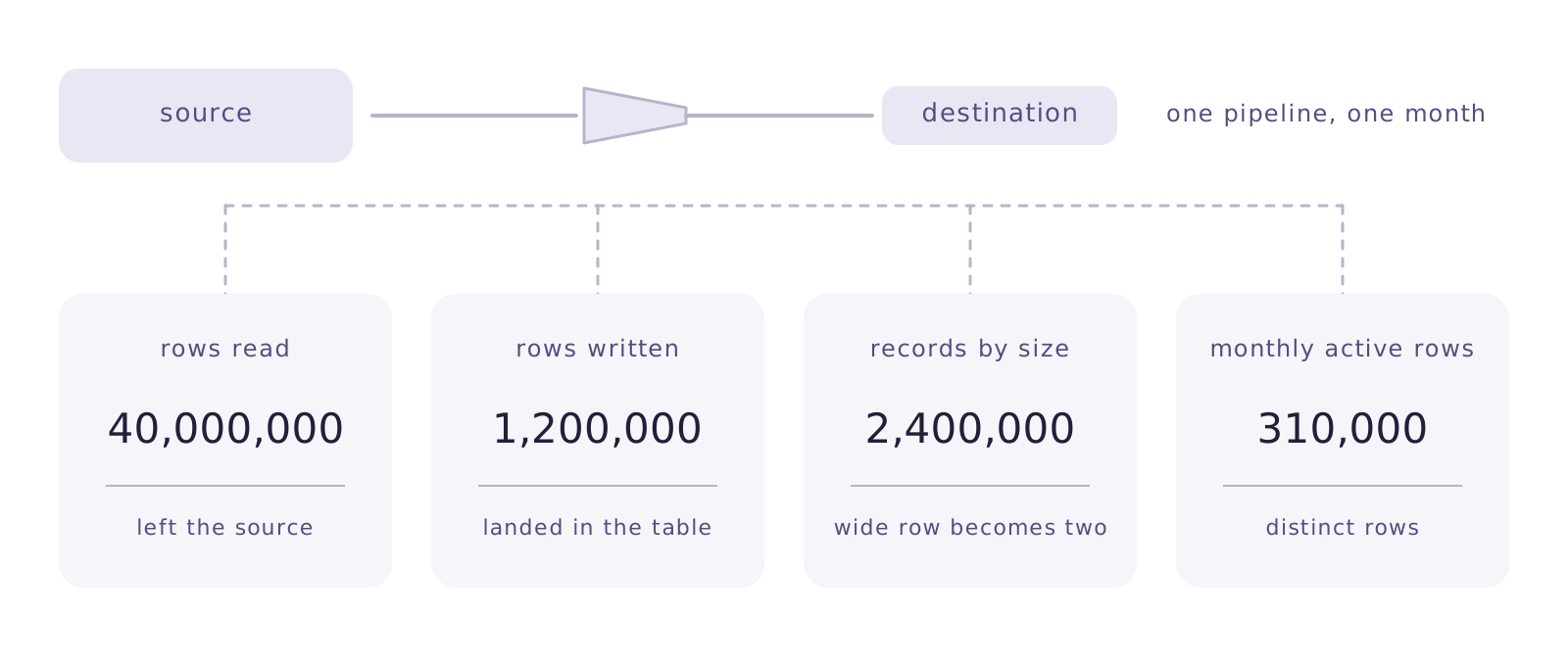
All four measure something legitimate. None of them is a trap. What differs is how each one reacts when you change something — and changing things is what a data team does all the time.
Rows read and rows written differ
The gap between the two is your filter. If the pipeline reads the whole orders table and writes only the current year, the difference is an order of magnitude.
Under a rows-read counter, tightening the filter changes nothing on the invoice. The work of reducing what reaches the destination still helps the database and the report, but it never shows up on the bill.
Under a rows-written counter, that same filter shows up next month. It is the difference between paying for effort and paying for outcome.
A concrete example
A manufacturer replicates its production log table, with 40 million historical rows. The report uses the last 18 months. With a daily full refresh and rows-read billing, all 40 million count every day. With incremental loading and rows-written billing, only what changed since yesterday counts.
The right question for a vendor is short: what exactly do you count?
The record that is measured in bytes, not rows
There is a third path, and it is the one that surprises people most: charge per row, but normalise the row by size. The rule sits in the documentation and almost nobody reads it before signing.
Kondado publishes its own in the plans and limits wiki, updated on 25 August 2026: each row of up to 500 bytes counts as one record, and larger rows are converted proportionally, rounded up. The example is from that page.
Ten thousand rows adding up to ten megabytes become twenty thousand billed records. Double, without a single extra row.
This is not a trick. It is a defensible engineering choice: a wide row costs more to move and to write. It just happens to penalise exactly the people with typical Brazilian ERP data, full of long description fields, complete addresses and nested JSON. Row width became price.
Monthly active rows and how the counter is grouped
The fourth unit counts each distinct row that changed during the month, not each operation. If the same order moved through eight statuses in August, it counts once.
It is the most generous unit for data that changes often, and that is why it exists. The thing to watch sits elsewhere: how the counter is grouped.
There is no generalising here, and it is worth asking rather than assuming. Does the same row replicated by two different connections count once or twice? Splitting one large pipeline into two smaller ones is a purely operational decision, and depending on the answer it moves the invoice with no new data arriving. Get the answer in writing, before you sign.
It is also worth looking at how many different units coexist in the market. On 10 August 2026 Fivetran published a comparison carrying the public prices of eight replication tools. Reading that table, plans are quoted in monthly active rows, in records per month, in events, in vCPU per hour and in gigabytes — five rulers that do not convert into one another.
Comparing price without comparing unit says nothing.
Five changes that raise the bill
Every one of them is something a data team does on an ordinary Tuesday, without thinking about the invoice.
- Swapping incremental for a full refresh. After one scare with a wrong number, someone reloads everything daily “to be safe”.
- Raising the frequency. Going from hourly to every fifteen minutes multiplies runs, and on some counters multiplies the bill.
- Splitting one pipeline into two. The same table starts being counted on two connections.
- Adding wide columns. On a size-based counter, three text fields can double the record.
- Reprocessing after a model change. The reload happens once, but it lands entirely inside one month.
None of those five shows up as “more data” in your inventory. That is why the conversation starts in the wrong place: you go looking for new data and the cause is an operational decision.
So read the counter, not the volume.
Three limits no billing unit fixes
Picking the right unit does not repair a badly designed pipeline. If you reload a fifty-million-row table every night because you do not trust incremental loading, the bill will hurt under any counter.
Predictability is also not the same as cheap. Rows-written billing with an invoice cap protects you from surprises, and can still cost more than an annual contract negotiated by volume. It depends on your change profile.
And no unit solves the case where the interesting data is small but changes constantly. An inventory table with thirty thousand items refreshed every minute produces far more writes than a historical base of ten million idle rows.
The unit explains the bill. It does not design the pipeline for you.
Where Januss comes in
In Januss the bill is per row written to the destination, not per row the pipeline had to read to get there. When a step is materialised as a view, it copies no data and consumes no allowance.
The usage screen for the period shows five numbers: consumed, allowance, overage, cap and due. Every plan has a cap the invoice does not cross, and the warning arrives at 80% and at 100% of the allowance — before the period closes, not after.
One part of this is usually told by halves, and the missing half is the one that matters. When the platform decides to redo a load on its own, the rows of that reload are marked non-billable and count towards neither the invoice nor the allowance. But the reset you asked for on screen stays billable, because that choice was yours.
Want to see it with your own volume? The 14-day trial asks for no card: create your workspace and watch the counter move with your data.
Sources
The billing rules quoted here are published by the vendors themselves:
- Kondado — Plans and Limits, updated 25/08/2026
- Fivetran — From open source to enterprise: 8 leading data replication tools, 10/08/2026
Create your workspace in minutes.
Point at your source and watch the data reach the database the same day.